
Your staff. Your companion. Your virtual friend.
A local AI companion with a memory of its own.
A local AI companion with a memory of its own.
Contents
The problem · The product · What makes it different · One brain, many surfaces · What it does for you · What we are looking for
The challenge · Read, understand, remember, recall · Measured results · Tech stack · Architecture · What we learned
01 · Part one
The vision: what TerranSoul is, and why it matters now.
The problem
Most assistants lose everything the moment you close the tab — no memory, no continuity.
Your data leaves your device every time you use it.
Powerful AI is locked behind a monthly subscription.
The product
Not a chatbot in a tab. TerranSoul is an on-device presence with persistent memory — it remembers across sessions and picks up right where you left off.
The demo
TerranSoul running locally — reading, remembering and recalling.
What makes it different
The language model never changes. The memory around it gets smarter instead.
Every memory is auditable, reversible and portable — you can inspect it and move it.
Built to plug into tools like Claude Code and OpenClaw — complementary, not competing.
Local models, no subscription, no cloud dependency.
One brain, many surfaces
The same memory, knowledge graph and code intelligence, served to every client over MCP.
What it does for you
An always-present companion for people living alone, or anyone who finds technology hard.
Free, local AI help — not gated behind a subscription only big budgets can afford.
Shares its memory with Claude Code, Copilot, Cursor and Codex, so they stop re-learning your context.
Runs on your own machine — your data never leaves your device.
02 · Part two
Under the hood: how the memory actually works.
The challenge
Hand the app a PDF or a scan and it sees pixels and characters, not meaning. Turning that into memory it can recall later is the hard part.
The hard part isn't storing text. It's turning text into something the app can recognise again when you ask a question worded completely differently.
The big picture
Parse documents and conversations into raw text.
Split into passages, embed each into a 768-dimension meaning space.
Store across three decaying tiers, link related facts in a knowledge graph.
Blend six retrieval signals and rerank before answering.
Step 1 · Read
An on-device engine looks at the image and reads the letters back out as text.
Including Vietnamese — accented characters that trip up most off-the-shelf readers.
“Tôi học tiếng Việt.” Those marks above the letters carry meaning. Drop one and the word changes — or the reader crashes.
Step 4 · Recall
The brain no longer just keyword-matches. It blends six signals, fuses them with reciprocal rank fusion, sharpens cold queries with HyDE, and reranks with a cross-encoder before anything reaches the model.
Architecture
A self-improvement loop runs alongside: write → manage → read, on every turn.
Tech stack
On-device first — private by default, no cloud required.
What we learned
On some benchmarks, a small frozen model with good memory outscores much larger fine-tuned ones.
Consolidation runs with a faithfulness check and a rollback, so memories shrink safely instead of vanishing.
Sharing memory over MCP means every tool stops re-learning the same context from scratch.
The hardest bugs still come from messy real-world data, not the demo.
Update
The original deck pitched a document-reading assistant. The current build is a lot bigger.
The same memory now serves Claude Code, Copilot, Cursor, Codex and peer TerranSoul instances over one protocol (MCP).
Answers now fuse vector search, keywords, recency and graph links, then get reranked before anything reaches the model.
First-party Discord, Telegram, Slack and WhatsApp bots route through the exact same brain as the desktop app.
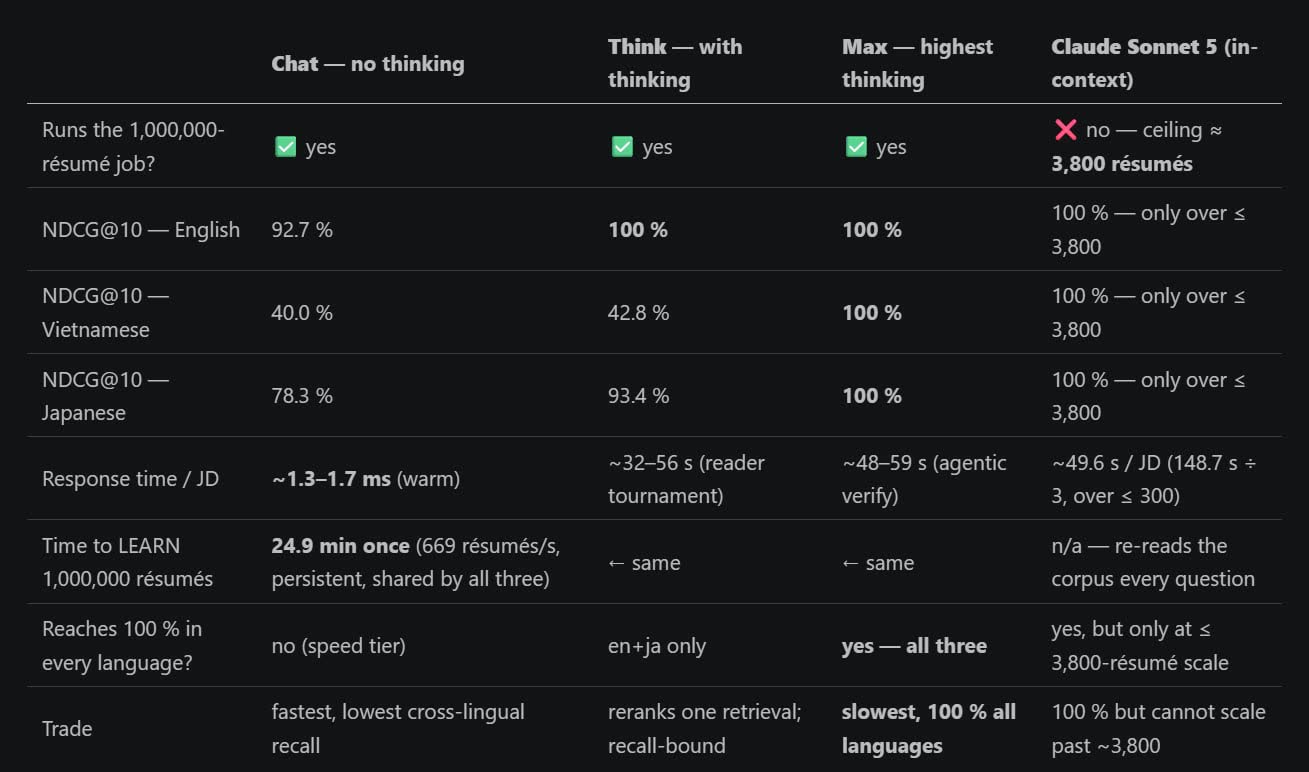
The team now publishes head-to-head recall and answer-quality numbers against other systems.
The guide
A guide sits on every page and answers from what this site actually publishes — the same memory idea TerranSoul is built on, pointed at our own pages. It cites the page each answer came from, so you can check it.
It answers from published passages and says it does not know when nothing matches. Ask it for a throughput figure and it declines, because we have not published one.
The memory graph, the deck, the Tesseres pipeline and the team pages are all indexed — so "where do I find…" is a question it can actually answer.
Open it from the button in the corner of any page.